Guide · updated 2026-08-30
Honeydue Alternative Without Bank Linking (2026)
If you're looking for a Honeydue alternative without bank linking, our take is that HomeWeal is a household bill tracker for couples, roommates, and cross-currency households that runs entirely manually. Honeydue is a genuinely useful free app for couples, but its core value comes from linking real bank, credit, loan, and investment accounts across more than 20,000 institutions — both partners see the same balances because both accounts are connected. HomeWeal takes the opposite approach: you never hand over bank credentials, to Honeydue or anyone else.

What does Honeydue do well, and where does it fall short?
Give Honeydue its due: it's free, it has real bill due-date reminders with per-partner notification choice, and it handles shared-expense splitting and settle-up in a way that's genuinely comparable to a dedicated tool like Splitwise. For a couple who's comfortable linking every account to one shared app, that's a strong, zero-cost package.
The trade-off is the same one every account-aggregation app makes: to see anything, you first connect real financial institutions through Honeydue's linking flow. That's a reasonable trade for some households and a hard no for others — shared credentials for a joint tool are a different comfort level than sharing a login with your own bank. Honeydue is also mobile-only, so there's no browser-based option if one partner prefers using a laptop.
How does a bill tracker work if it never connects to your bank?
You add each recurring bill — rent, utilities, subscriptions, insurance — with its amount, due date, and currency. HomeWeal tracks status from "upcoming" to "paid," and the split math runs on top of that record. The difference from an aggregator like Honeydue: "paid" is something a household member confirms, not something detected from a linked transaction feed. You still pay however you normally do; marking it paid in HomeWeal takes about ten seconds and never depends on a bank sync succeeding.
Why avoid linking a bank account for shared household bills?
Some couples are entirely comfortable with account aggregation. Others aren't — and the reasons are practical, not paranoid: fewer credentials in fewer third-party systems, no dependency on a sync staying healthy across two people's banks at once, and no ads or tip prompts funding the free tier. Honeydue's model works because account linking is the product; HomeWeal's manual entry is the product, and the bill tracking is the same either way — the question is only how the data gets in.
How do you split bills and settle up with a partner?
Honeydue's split-and-settle feature is free and unlimited — that's a real strength worth naming plainly. HomeWeal's equivalent lives on the Family plan ($14/mo or $132/yr early-bird); Solo and Pro are single-user. What Family adds beyond splitting is per-bill multi-currency auto-conversion and an on-time payment Health Score, neither of which Honeydue offers in the same form.
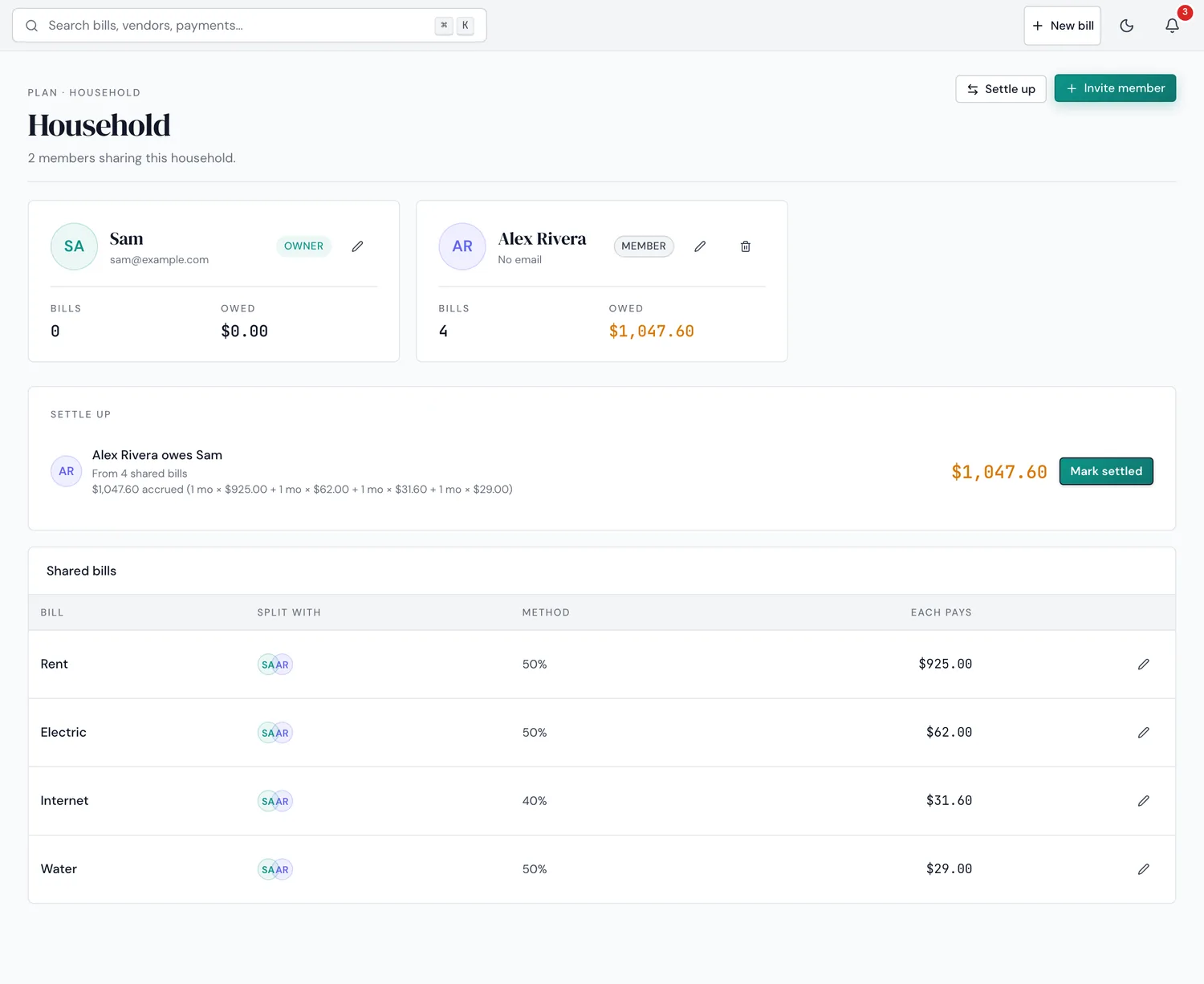
The actual Household settle-up screen — manual entry, no linked accounts behind it.
How does HomeWeal compare to Honeydue?
| Feature | HomeWeal | Honeydue |
|---|---|---|
| Bank linking required | No, never — manual by design | Yes, core to the product (20,000+ institutions) |
| Platform | Web + installable iOS/Android | Mobile only (iOS/Android) |
| Bill due-date reminders | Native, per-bill, web push | Yes, with per-partner notification choice |
| Split expenses & settle-up | Family plan ($14/mo) | Free, unlimited |
| Multi-currency bills | Auto-converted per bill | Primarily US-focused; limited outside 5 supported countries |
| Price | Free Solo; $9 Pro; $14 Family | Free (ad-supported + optional tips) |
| Data access after cancellation | Read-only retained | n/a — always free |
Who shouldn't switch from Honeydue to HomeWeal?
If you're happy linking accounts, want the split-and-settle feature for free, and only need a phone app, Honeydue is a genuinely good fit — switching would cost you money for features you can already get free. HomeWeal makes sense when the bank-linking step itself is the problem, when you want a browser option, or when your household pays bills in more than one currency and wants that handled per bill rather than as a US-centric conversion.
Geography matters here too. Honeydue's bank connections cover more than 20,000 institutions, but only across a handful of countries, so a household with accounts outside that footprint may find linking unreliable or unavailable regardless of how they feel about it in principle. HomeWeal never needs a bank connection at all, so this particular limitation doesn't come up — the bill still gets tracked whether the bank behind it is reachable by an aggregator or not.
What are the common mistakes people make when switching?
- Expecting automatic detection. HomeWeal won't notice a payment the way a linked-account app does — that's the trade you're making, not a bug.
- Skipping the currency field on cross-border bills. Conversion only happens if a bill is tagged with its real currency.
- Assuming splitting is free. Unlike Honeydue's split feature, HomeWeal's lives on the Family plan — check pricing before promising a partner a feature Solo doesn't include.
What about the other couples'-finance apps people mention?
You'll also see Monarch and Copilot suggested for shared finances — both are single-account-holder apps with shared views bolted on, and both require bank linking too. Honeydue is the one actually built for two people from the start; the bank-linking requirement is the one thing it shares with the others.
If Splitwise is also on your shortlist, our Splitwise alternative guide covers why one-off expense trackers handle recurring bills differently than a purpose-built tracker does.
Our bottom line
Honeydue is a strong, genuinely free choice if you're comfortable linking accounts and only need a phone app. If the bank-linking step is what you're trying to avoid — or you need a browser option, or per-bill currency conversion — HomeWeal is built for that instead. Start with the free Solo plan; Family unlocks splitting at $14/mo. Pay-now billing, 30-day money-back guarantee, no free trial.