Guide · updated 2026-08-09
Copilot Alternative Without Bank Linking (2026)
If you're looking for a Copilot alternative without bank linking, our take is that HomeWeal is a household bill tracker for couples, roommates, and cross-currency households that works without bank linking — the right choice depends on whether you need investment tracking or just bill accountability. Copilotis excellent at what it does, but it's iOS-only and requires read-only bank connections (through an aggregator like Plaid) to function at all.

What does Copilot do that you'd actually miss?
Copilot's core strength is automated transaction categorization — it pulls every purchase from linked accounts and applies machine-learning rules to sort it. We'll say it plainly: no manual-first tool matches that convenience. But that convenience requires bank linking to be non-optional, and Copilot doesn't do shared household bill management — it's designed around one person's finances, not two people splitting rent and utilities across currencies.
Who is a manual-first bill tracker actually for?
A manual-first tracker makes sense if you have a predictable set of recurring bills and want to know, at a glance, what's due, what's paid, and who owes whom. You're not trying to catch every coffee purchase — you're making sure the internet bill gets paid on the 15th and your roommate's share of the electricity is settled by month-end. HomeWeal fits that pattern: enter each bill manually — amount, due date, currency, who's responsible — and the tracker handles the rest. No bank connection to set up, no credential sharing, no sync failures. The tradeoff is entering the data yourself; for a household with 10-20 recurring bills, that's roughly 15 minutes of setup and a few seconds per payment afterward. If your financial life involves dozens of variable daily transactions and you want automatic categorization, a manual tracker will frustrate you — that's the honest boundary.
How does HomeWeal compare to Copilot for couples and roommates?
Copilot tracks spending. HomeWeal tracks bill obligations and settlements. They overlap in the "money leaving your account" sense, but answer different questions.
The multi-currency piece is worth calling out: if one partner earns in USD and the other in EUR, Copilot shows transactions in your base currency but doesn't handle per-bill conversion well. HomeWeal converts each bill at the current rate when you log it, so the split reflects what you actually owe today.
What does the Family plan give you for splitting bills?
Split and settle-up lives on the Family plan ($14/mo or $132/yr early-bird) — Solo and Pro are single-user, so Family is required if you want to share a household.
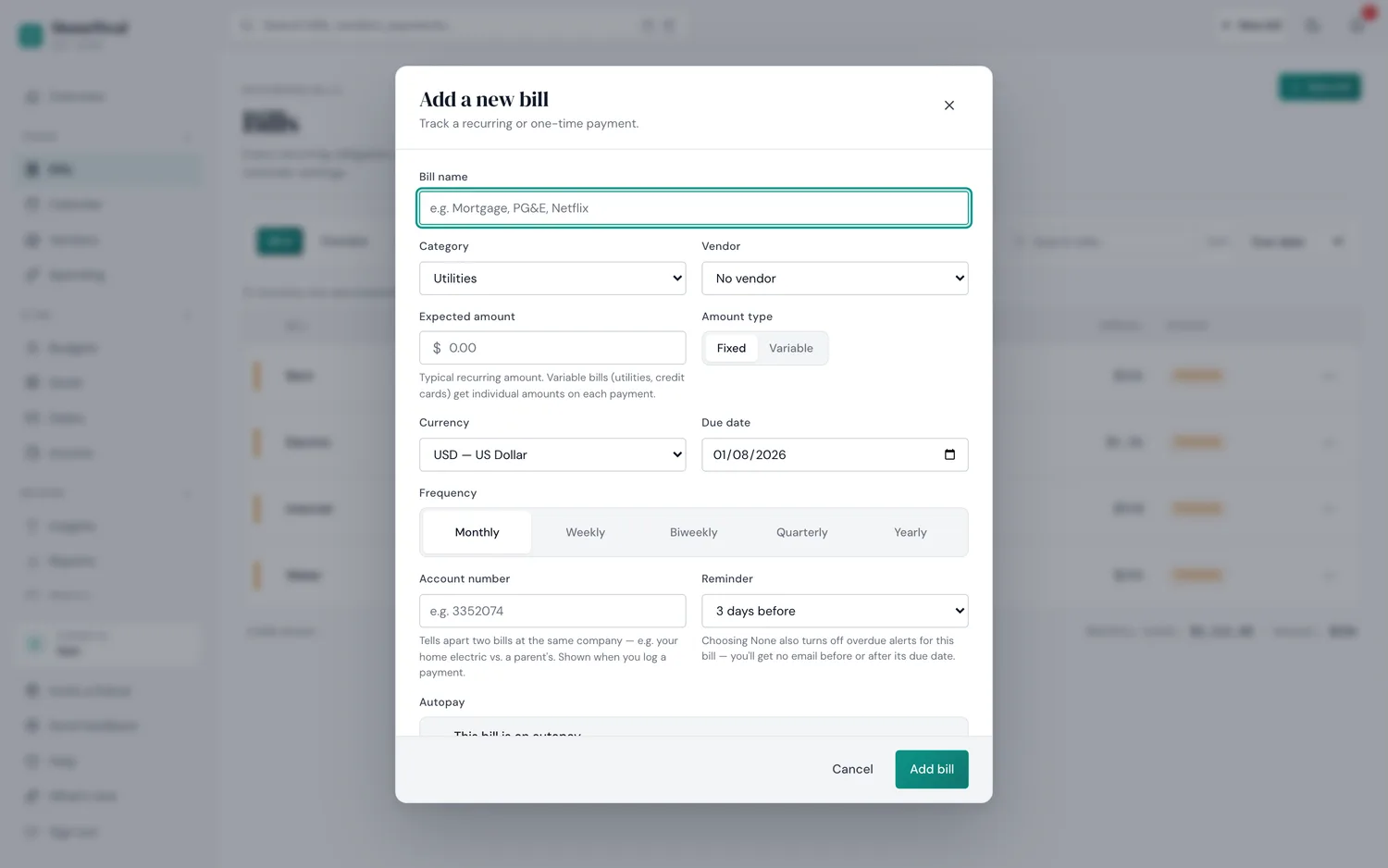
The actual "add a bill" form — no bank connection to set up, just the bill's details.
- Create a household and invite members by email — each person gets their own login.
- Add a bill and set a split rule — 50/50, percentage-based, or fixed amounts. The rule applies every time the bill recurs.
- Log payments as they happen — mark who paid and when.
- Review the net balance — the settle-up view shows who's ahead and who owes what.
The key difference from a tool like Splitwise is that HomeWeal is built for recurring bills first, not ad-hoc expenses.
When should you just use a spreadsheet instead?
A spreadsheet is a legitimate answer for some households, and we're not going to pretend otherwise — two bills, one roommate, full trust, a shared sheet costs nothing. It breaks down once currencies differ or you need to settle up fairly across several bills. Our guide on splitting bills with a roommate without a spreadsheet walks through where that line actually sits.
What about YNAB or Monarch as alternatives?
YNAB and Monarch are both legitimate, more full-featured budgeting apps than HomeWeal — and both, like Rocket Money, still lean on bank linking for their best experience. If you want a bill tracker without bank linking, none of them are purpose-built for that. They're generalists; HomeWeal is a specialist.
Is the early-bird pricing worth locking in now?
Solo is free forever, capped at 10 bills, single user. Pro and Family are both at early-bird rates that rise in 2027 for new signups only — existing subscribers keep their locked-in rate. There's no free trial; billing is pay-now with a 30-day money-back guarantee. If you need the split features, Family at $132/yr early-bird is the one to consider — locking in now protects you against the 2027 increase, and the money-back guarantee keeps the risk window small.
Common mistakes when switching from Copilot
- Trying to replicate Copilot's transaction-level visibility. A bill tracker won't tell you that you spent $14 on lunch three times this week — it tells you rent, utilities, and subscriptions are accounted for. Different jobs.
- Abandoning the tool after a week of forgetting to log a payment. Manual entry needs a habit loop; if you won't build a 30-second habit, this is a workflow mismatch, not a product flaw.
- Ignoring the Health Score. Not gamified, no streaks — just a signal that something needs attention if it dips.
Our bottom line
Copilot is a strong product for individuals comfortable with bank linking and iOS only. It's not a household bill tracker, and it can't function without bank access. HomeWeal is manual-first, cross-platform, handles multi-currency bills natively, and gives couples and roommates a real split-and-settle-up workflow on the Family plan. Pay-now billing, 30-day money-back guarantee, no free trial.