Guide · updated 2026-08-09
Best Bill Tracker Without Bank Linking (2026)
The best bill tracker without bank linking in 2026 is HomeWeal, a household bill tracker for couples, roommates, and cross-currency households that works without bank linking. It combines manual-first entry, per-bill multi-currency auto-convert, and a 0-100 on-time payment Health Score to keep recurring household bills organized without connecting a single financial account.

Why would I want a bill tracker that doesn't link to my bank?
Here's the trade nobody spells out when you link a bank account: convenience now, in exchange for an app that can see everything you spend, forever. Bank linking almost always runs through a third-party aggregator like Plaid— continuous read access to your transaction history, your merchant list, your paycheck timing. Some budgeting apps earn that trust. Most bill-tracking use cases don't need it at all.
A manual bill tracker flips the trade. You type in the amount, the due date, the category. The app does the rest — the math, the reminders, the on-time history. It costs you a few minutes a week. What you get back is an app that never sees your coffee habit, your bank balance, or your paycheck deposit, and a household where you're not obligated to share a full financial picture just to split the electric bill.
What should I look for in a bill tracker without bank linking?
Strip away the marketing pages and there are really only a handful of things that matter day to day:
- Manual entry speed — adding a bill should be a 10-second task, not a data-entry project.
- Recurring schedule support — weekly, monthly, quarterly, and custom intervals.
- Multi-currency handling — if household members are paid in different currencies, bill amounts should auto-convert so you're always comparing the same thing.
- Split and settle-up logic — for shared bills, the app should track who paid and who owes whom.
- Payment status tracking — mark bills paid and see a history of on-time versus late payments.
- Export and exit freedom — your data should export to CSV any time, with read-only access preserved if you cancel.
Miss any one of those and you're back to a spreadsheet with extra steps.
How does HomeWeal compare to YNAB, Monarch, Copilot, and Splitwise?
Short version: HomeWeal is the only one of these built exclusively for bill tracking without bank linking. That's a narrower job than what the others do, and that's the point — don't reach for HomeWeal if you want a full budgeting suite; reach for it if you want one thing done well and your bank login left alone.
Give YNABcredit where it's due: zero-based budgeting with full bank sync, a powerful envelope system if you're willing to learn the method (envelope-style apps like Goodbudgettake a similar manual-envelope approach without the bank sync). It's just overkill if all you want is bill tracking. Monarch is the polished choice for a broader net-worth view — bills and investments together — though bill tracking is a side feature there, not the main event. Copilot is arguably the best-looking app on this list, genuinely nice to use, but Apple-only and built around bank sync. And Splitwise? Best tool here for pure expense splitting among a group. Just don't expect due dates, payment status, or an on-time history — it's not built to track any of that.
How do I set up HomeWeal for my household?
Five minutes, no bank credentials. Adding a bill looks like this:
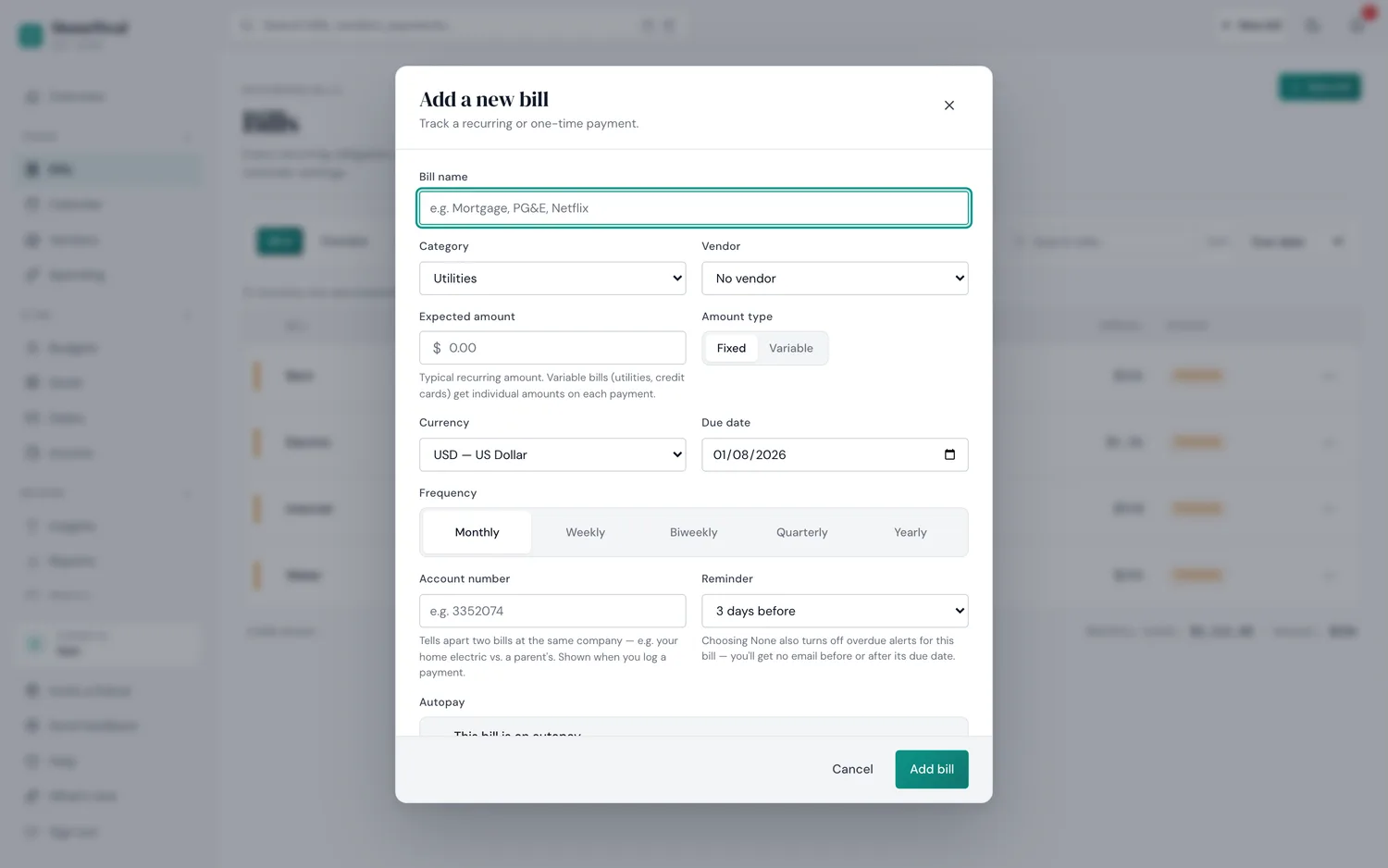
The actual HomeWeal "add a bill" form — every field is typed in, nothing is pulled from a bank feed.
- Add your bills. Enter the bill name, amount, due date, and currency. Multi-currency households get auto-conversion at the current rate on every bill.
- Turn on reminders. Set reminder timing (e.g. 3 days before due). Notifications are calm by design — no streaks, no badges.
- Mark bills as paid. HomeWeal records on-time status and updates your Health Score.
- Export any time. Download a CSV of every bill and payment, free on every plan.
- If you're splitting with a household (a partner or roommate), the Family plan ($14/mo or $132/yr) adds up to 6 members, per-bill split rules, and a settle-up tracker that shows who owes whom. Solo and Pro are single-user plans — for shared splitting, Family is what you want.
Who is this NOT for?
Skip it if you want automatic transaction categorization, or if you routinely carry more than 10 bills and were hoping to stay free (Solo caps at 10). Skip it too if you want an app that just knows what you spent without you typing anything — manual entry is a feature if you care about privacy, a chore if you don't. If that's you, Monarch or Copilot with bank sync will genuinely serve you better; use them. And if you're splitting an eight-person group vacation rather than a monthly electric bill, Splitwise is the right call — HomeWeal is built for the bill that repeats, not the one-off dinner.
Common mistakes when switching to a manual bill tracker
The switch usually goes wrong in one of five predictable ways:
- Entering every transaction. HomeWeal is for bills, not your daily coffee. If you're logging every purchase, use a budgeting app instead.
- Skipping the settle-up step. The split feature only helps if you actually settle up. Letting balances roll over turns tracking into a source of resentment.
- Ignoring the Health Score. It's a leading indicator of missed due dates — a drop is a signal to check your reminder settings.
- Forgetting to export. CSV export is free and always available; download a copy periodically as a backup.
How does the pricing actually work?
No free trial — pay-now billing with a 30-day money-back guarantee instead. Solo is free forever, capped at 10 bills, single user. Pro runs $9/mo or $84/yr at the early-bird rate (rising to $11/mo in 2027 for new signups; existing subscribers keep their locked rate). Family is $14/mo or $132/yr early-bird, same 2027 lock-in logic (rising to $16/mo for new signups), and it's the plan that actually unlocks household splitting: up to 6 members and the settle-up tracker. Cancel any time and you keep read-only access to everything you've already logged.
Bottom line
Our take: worth it for cohabiting households who want to split bills fairly, track on-time payments, and keep bank data private. If you want a full budgeting app with bank sync, YNAB or Monarch are excellent at that job. If you want a focused bill tracker that respects your privacy and handles multiple currencies, start with HomeWeal.