Guide · updated 2026-08-09
Best Splitwise Alternative for Recurring Household Bills (2026)
If you're looking for a Splitwise alternative specifically for recurring household bills, the honest answer is that HomeWeal is built for exactly that use case — but it's not the only option, and for some households, Splitwise itself still wins. HomeWeal is a household bill tracker for couples, roommates, and cross-currency households that works without bank linking. It handles the monthly grind of rent, utilities, and subscriptions with per-bill multi-currency auto-convert and a 0-100 on-time payment Health Score. Below, we compare it against Splitwise, YNAB, Monarch, and Copilot so you can decide which tool actually fits how your household operates.

What makes Splitwise annoying for recurring bills specifically?
Splitwiseis excellent at what it was designed for: one-off shared expenses between friends — a dinner out, a group trip, a shared gift. But recurring household bills expose its weaknesses quickly. Every month, the same rent payment, the same electricity bill, the same internet charge — and you're manually re-entering each one, hoping you remember the exact amount and who paid it last time.
The bigger problem is that Splitwise doesn't track whethera bill got paid on time. It tracks who owes whom. That's a meaningful distinction. If your roommate is supposed to pay the electric bill and forgets for three weeks, Splitwise will still show a clean balance — the bill simply didn't get paid. There's no health score, no payment history, no gentle nudge tied to the actual due date.
Splitwise also doesn't handle currency conversion natively for recurring bills. If you're in a cross-currency household, you're doing manual conversion math every month. That's precisely the friction HomeWeal was designed to remove.
How does HomeWeal handle recurring bills differently?
HomeWeal starts from a different premise: the bill itself is the unit of tracking, not the transaction. You enter each recurring bill once — rent, electricity, internet, streaming services — and it stays on your dashboard with its due date, amount, and responsible member. When the bill gets paid, you mark it paid. That's the entire loop.
The manual-first entry model is deliberate. We don't link to your bank accounts, and we never will as a core requirement (a bank-sync add-on is on the roadmap, but it's not here yet). For cross-currency households, each bill carries its own currency setting — if your rent is in euros and your salary is in dollars, HomeWeal auto-converts the bill amount using current exchange rates every time it comes due.
The Health Score is the feature that keeps households honest. Every bill contributes to a 0-100 score based on on-time payment history. Miss a due date and the score drops. It's not gamified — no badges, no streaks, no confetti — just a number that tells you at a glance whether your household is on top of its obligations.
What about splitting and settling up between members?
This is where we need to be precise about what HomeWeal does and doesn't do, because the tier structure matters.
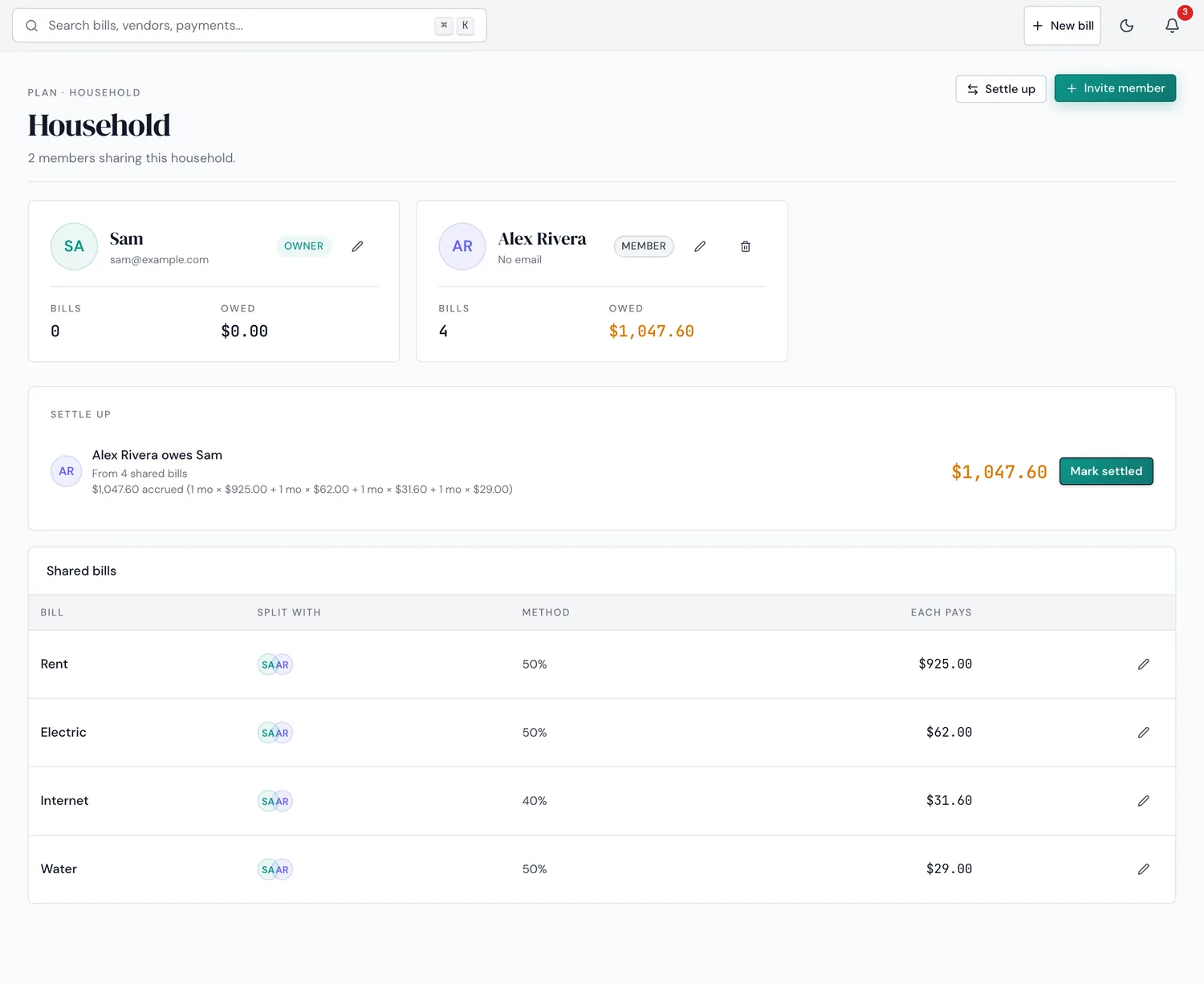
The actual Household screen — this is the Family-plan feature described below.
On the Family plan ($14/mo or $132/yr), you get household bill splitting, a settle-up tracker, member invites, and support for up to 6 members. The settle-up tracker shows outstanding balances between members — visible until you transfer it however you already send each other money: Venmo, PayPal, cash, or a bank transfer. HomeWeal doesn't move the money itself, it just tells you the number.
On Solo (free forever, capped at 10 bills) and Pro($9/mo or $84/yr early-bird), you get the full bill-tracking experience but not the multi-member splitting features — those are Family-plan only. We're explicit about this because we'd rather you know the limitation upfront than discover it after signing up.
How does HomeWeal compare to YNAB, Monarch, and Copilot?
The budgeting apps deserve genuine credit where they win. YNAB is a genuinely powerful zero-based budgeting tool. Monarch has the best-in-class bank-sync experience and a polished interface for net-worth tracking. Copilotis the most beautiful finance app on iOS. But none of them are bill trackers — they're budgeting apps that happen to include bill reminders as a secondary feature.
| Feature | HomeWeal (Family) | Splitwise | YNAB | Monarch | Copilot |
|---|---|---|---|---|---|
| Recurring bill tracking | Native, bill-centric | Manual re-entry monthly | Indirect via categories | Indirect via cash flow | Indirect via recurring transactions |
| Bank linking required | No | No | Yes (or manual import) | Yes | Yes |
| Multi-currency per bill | Yes, auto-convert | No | Limited | Limited | Limited |
| Payment Health Score | Yes (0-100) | No | No | No | No |
| Bill splitting & settle-up | Yes (Family plan) | Yes | No | No | No |
| Works without bank credentials | Yes | Yes | No | No | No |
If you need bank-sync-driven budgeting, YNAB, Monarch, or Copilot are better tools — and we'll say that plainly. If you need one-off expense splitting with friends, Splitwise is better. If your problem is specifically recurring household bills and you don't want to hand over bank credentials, HomeWeal is the only tool in this comparison built for that exact job.
Who this isn't for
Skip HomeWeal if you want automatic transaction import and categorization — the bank-sync add-on isn't available yet, and Monarch is our pick if that's the dealbreaker. Skip it too if you need investment tracking or net-worth dashboards — YNAB or Monarch will give you the full financial picture. And if you're a group of friends splitting a weekend rental or a dinner tab, Splitwise is faster, simpler, and free — use it. HomeWeal's multi-member features are designed for ongoing households, not transient groups.
Common mistakes households make with bill tracking
- Relying on memory and text messages. It's not a question of whether you'll miss a bill this way — it's when.
- Treating a budgeting app as a bill tracker. Being "in the budget" isn't the same as actually paid.
- Renegotiating the split every month. Set the split once on the Family plan and leave it alone — re-litigating it monthly breeds resentment.
Our bottom line
For cohabiting and cross-currency households that split recurring bills, HomeWeal is the most direct fit — it tracks bills without surveillance or gamification. But if you want bank-sync automation, choose Monarch or YNAB. If you want one-off splitting with friends, choose Splitwise. HomeWeal wins the specific job of recurring household bill tracking, and that's the job it set out to do.