Guide · updated 2026-08-09
What Is a Household Bill Tracker?
A household bill tracker is a tool for logging, organizing, and splitting the recurring expenses you share with the people you live with — rent, utilities, internet — without connecting your bank accounts. HomeWeal is a household bill tracker for couples, roommates, and cross-currency households that works without bank linking. It answers one question budgeting apps don't: what do we owe each other, and when is it due?

How is it different from a budgeting app?
Budgeting apps like YNAB and Monarchstart with your income and categorize every dollar you spend — powerful for personal finance, but built around one person's relationship with money. A household bill tracker flips the focus: it starts with the shared bills themselves, then tracks who pays what and who owes whom.
There's also a privacy angle. Most budgeting apps require bank linking to function at all — usually routed through a third-party aggregator like Plaid. A bill tracker that works without it keeps your bank data out of a third-party system entirely — for many people, that's the whole point.
What does a household bill tracker actually do?
At minimum, it logs four things per bill: the amount, the due date, who paid it, and who owes what share.
- Bill logging and due-date tracking. Enter each recurring bill once; it shows up on a shared list. No more "did you pay the internet?" texts.
- Split calculation. Divides each bill by your agreed percentages — 50/50, proportional, or custom.
- Settle-up tracking. When one person covers a bill, it records that the other now owes them, netting out over time.
- Payment history. A running record of what's been paid, when, and by whom.
- Reminders. Gentle nudges before a due date.
HomeWeal adds two things most trackers don't have: per-bill multi-currency auto-convert (each bill logs in its original currency and converts automatically), and a 0-100 on-time payment Health Score for the household.
Who actually needs one?
The clearest fit is a cohabiting couple with separate incomes and accounts — merged households, not merged finances. Roommates are the second obvious group: the classic "bills person" who fronts money and chases everyone else for it. Cross-currency households have a genuinely unique problem — someone's always doing mental math on exchange rates without a tracker that converts per bill.
How do you set one up in five steps?
Here's the setup process in HomeWeal specifically:
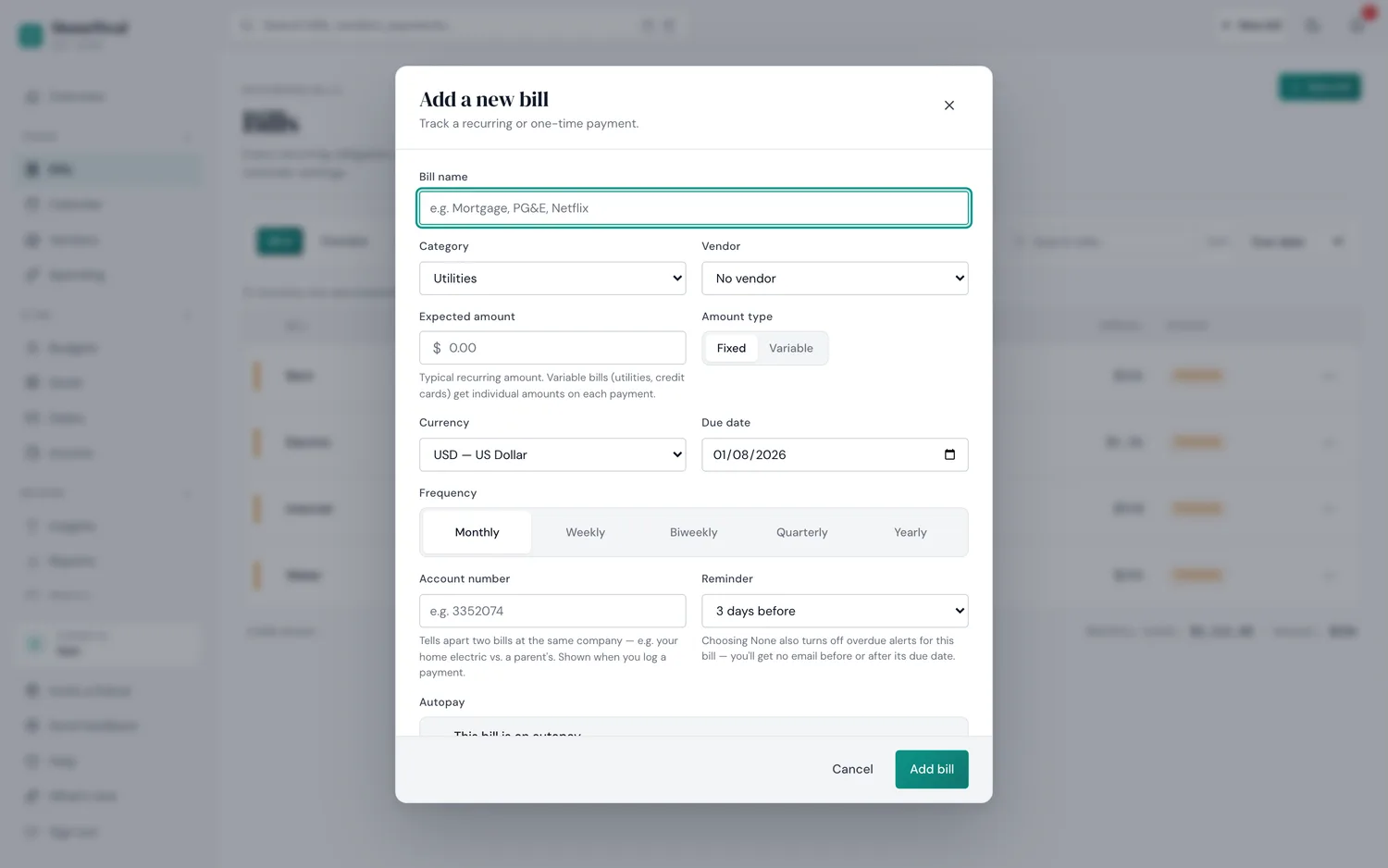
The actual "add a bill" form — currency is a per-bill field, entered manually.
- Create the household and invite members. The Family plan ($14/mo or $132/yr) supports up to 6 members — Solo and Pro are single-user.
- Add your recurring bills. Name, amount, due date, and currency.
- Set your split rules. Default household split, overridden per bill where needed.
- Assign who pays each bill. The tracker records what the others now owe.
- Check the Health Score and settle up monthly. Review the settle-up tracker and transfer one payment.
Setup takes about 15 minutes; ongoing maintenance is logging a bill when it arrives — roughly 30 seconds each.
What are the common mistakes people make?
- Treating it like a budgeting app. A bill tracker isn't for capturing coffee purchases or categorizing groceries. Keep it for recurring shared bills; let a budgeting app handle personal spending if you want that detail.
- Splitting every bill equally without discussion. The tool handles the math, but you still need to agree on the split — proportional-to-income is common for couples, equal is common for roommates.
- Forgetting to mark who actually paid. The settle-up tracker only nets out correctly if the payer is recorded accurately.
- Ignoring the Health Score. It's a leading indicator — if it dips, address it that month, not after late fees accumulate.
- Not exporting data before canceling. Even with read-only access after cancellation, export your CSV history while you're still active — a five-minute task that saves reconstruction later.
Who shouldn't use one?
If you and your partner fully merge finances — one joint account, nothing separate — a bill tracker is redundant. If you want a complete budgeting system with spending categories and investment tracking, Copilotor Monarch are better fits — they're solving a bigger problem than the one you asked about. And if you split exactly one bill with one roommate, a tracker is overkill; see our guide on splitting bills without a spreadsheet for where the line actually sits.
How does HomeWeal compare to the alternatives?
| Tool | HomeWeal | YNAB | Monarch | Copilot | Splitwise |
|---|---|---|---|---|---|
| Bank linking required | No | Yes | Yes | Yes | No |
| Built for households | Yes | No | Partial | No | Yes |
| Multi-currency per bill | Yes, auto-convert | No | No | No | Limited |
| Split & settle-up tracking | Yes (Family plan) | No | No | No | Yes, no bill tracking |
| Price | Free (Solo) / $9 Pro / $14 Family | $14.99/mo | $14.99/mo | $95/yr | Free / $3.99 Pro |
Splitwiseis the closest competitor — it handles splits and settle-ups without bank linking. Where it falls short is bill tracking itself: no due dates, no payment status, no on-time history. It's a debt tracker, not a bill tracker.
Bottom line
A household bill tracker is a narrow tool for a real problem: the recurring mental load of shared bills. Our take — the best tool is the one that reduces anxiety without adding surveillance. Start with the free Solo plan, then upgrade to Family when you're ready to invite your household. Pay-now billing, 30-day money-back guarantee, no free trial.