Guide · updated 2026-08-09
YNAB Alternatives Without Bank Linking (2026)
If you want YNAB alternatives without bank linking, our take is this: HomeWeal is the only tracker here built specifically for cohabiting and cross-currency households that skips bank sync entirely — but the real question isn't which app can technically work without bank linking, it's which one was designed for that workflow from day one.

Why skip bank linking in the first place?
The pitch from every major budgeting app is the same: connect your accounts, watch transactions flow in automatically, and never manually categorize again. Bank linking means your financial data lives on someone else's server, accessible through third-party aggregators like Plaid. That's not inherently dangerous, but it means trusting a chain of companies with your complete transaction history — and a growing number of households are deciding that trade isn't worth it for something as simple as tracking rent and utilities.
There's a practical angle too: bank sync breaks. Banks change their APIs, aggregators lose connections, and an "automatic" tracker develops gaps you have to reconcile manually anyway. A manual-first system has no such failure mode — what you enter is what's tracked.
What does YNAB do well that you'd be giving up?
Credit where it's due: YNAB's zero-based budgeting method — giving every dollar a job — is a legitimate behavioral framework that has helped a lot of people get out of debt and build savings (envelope-style apps like Goodbudget take a similar manual-envelope approach without the bank sync). It handles bank linking well when it works, and the mobile app makes categorizing painless.
What YNAB doesn't do well is household bill tracking without bank linking. You can manually enter transactions, but the entire interface is oriented around the linked-account workflow — no dedicated bill calendar, no per-bill currency conversion, no split-and-settle mechanism for roommates.
How does HomeWeal compare to the big budgeting apps?
HomeWeal is a household bill tracker for couples, roommates, and cross-currency households that works without bank linking. It's not a budgeting app, and it doesn't try to be — that positioning is deliberate.
| Feature | HomeWeal | YNAB | Monarch | Copilot | Splitwise |
|---|---|---|---|---|---|
| Bank linking required | No — manual only | Optional, but core workflow assumes it | Optional, heavily promoted | Optional, heavily promoted | No |
| Multi-currency per bill | Yes, auto-converted | No — single currency | No — single currency | No — single currency | Limited |
| Household bill split & settle-up | Yes (Family plan) | No | No | No | Yes, but no bill tracking |
| On-time payment Health Score | Yes (0-100) | No | No | No | No |
| Free tier | Yes (Solo, 10 bills) | 34-day trial only | 7-day trial only | No free tier | Yes, with ads |
The honest take: Monarch and Copilot are excellent budgeting apps with genuinely useful features. If you want a full financial picture with investments and spending analytics, either is a strong choice. But neither was built for household bill-splitting, and their manual-entry workflows feel like an afterthought. Splitwisewins on simplicity for splitting expenses, but it's not a bill tracker — no due-date awareness, no on-time tracking.
How do you split bills with roommates using HomeWeal?
Splitting and settling up — inviting members, per-bill split rules, the settle-up tracker — is a Family-plan feature ($14/mo or $132/yr early-bird). Solo and Pro are both single-user plans.
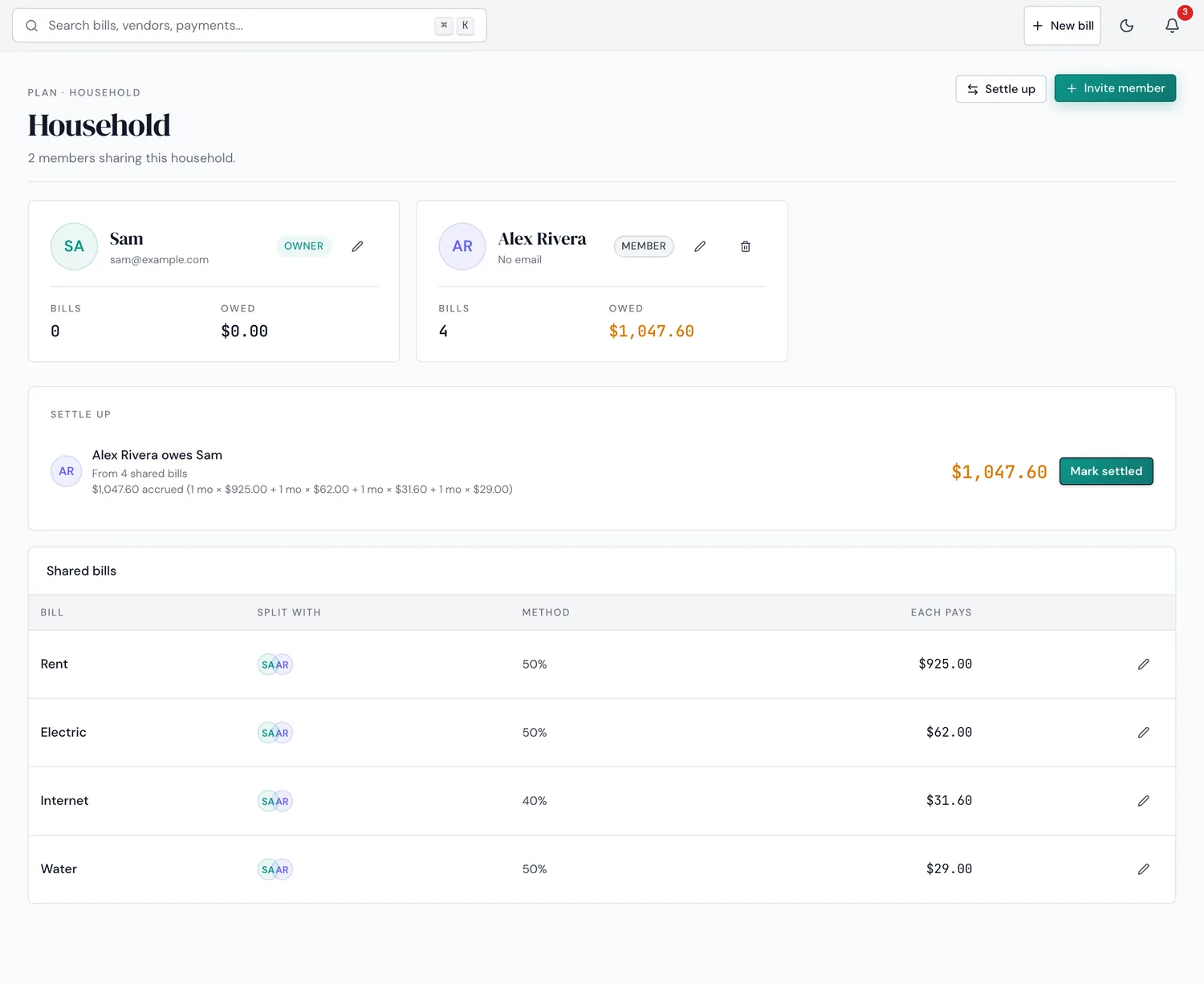
The actual Household screen — the same settle-up tracker referenced throughout this article, on the Family plan.
- Create your household and invite members. Up to 6 members on Family. Each person gets their own login and sees the shared bill list.
- Assign bills to members. For each recurring bill, decide who's responsible or whether it's split evenly.
- Use the settle-up tracker. It nets out who owes whom — not a payment processor, so you settle however you prefer (cash, Venmo, bank transfer).
- Monitor the Health Score per bill. A 0-100 signal for whether bills are on time — not gamified, no streaks.
Who shouldn't switch to a no-bank-link tracker?
If you're a single person who wants comprehensive budgeting — category-by-category spending, investment tracking, net worth — a no-bank-link bill tracker is the wrong tool; stick with YNAB, Monarch, or Copilot. And if your household's anxiety is about overspending rather than missed bills, a bill tracker won't solve that — HomeWeal tells you whether rent and utilities are paid on time, not whether you're spending too much on restaurants.
Common mistakes when switching from YNAB
- Replicating YNAB's budgeting workflow inside a bill tracker. You don't need categories for groceries or entertainment — just a clear list of recurring obligations and whether they're paid.
- Ignoring currency conversion in a cross-currency household. Enter each bill in its original currency; HomeWeal converts it. Entering everything in one currency recreates the exact problem the app solves.
- Treating the Health Score as gamification. It's a diagnostic, not a streak counter. A drop means a bill is late or at risk — fix the bill, not the number.
Our bottom line
If your core need is a full budgeting system, YNAB remains best-in-class. But if you're a cohabiting or cross-currency household that wants recurring bills tracked without bank sync, that's the gap HomeWeal fills. Start with the free Solo plan; the Family plan's settle-up tracker is $14/mo when you're ready to split bills with someone. Pay-now billing, 30-day money-back guarantee, no free trial.