Guide · updated 2026-08-09
Multi-Currency Budgeting App for Couples (2026): The Honest Guide
If you and your partner live together, share rent, groceries, and utilities, and deal with more than one currency, our take is you don't need a budgeting app — you need a bill tracker that handles currency conversion without linking your bank accounts. HomeWeal is a household bill tracker for couples, roommates, and cross-currency households that works without bank linking, and it treats currency conversion as a per-bill feature rather than an afterthought.

Why do "budgeting apps" keep failing cross-currency couples?
The pitch from YNAB, Monarch, and Copilot sounds perfect: connect your accounts, see everything in one place, let the software categorize your spending. For a couple in one country with one currency, that works reasonably well. For a couple splitting time between London and Lisbon, it falls apart quickly.
These apps assume a single home currency. When you log a transaction in EUR but your budget is in USD, you get a conversion rate that's whatever the bank feed happened to use that day — and they require bank linking, meaning both partners' financial data flows through a third-party aggregator. Monarch deserves credit for cleaner multi-account support than most, and Copilot's Mac app is genuinely pleasant. But none of them solve the actual problem: tracking a shared bill when the bill itself is denominated in a currency your budget isn't.
What should a multi-currency household tracker actually do?
A cross-currency couple typically has three recurring scenarios: a bill in one currency while your household's base currency is another; a shared bill split between two people who each pay in their own currency; and recurring bills where the exchange rate moves month to month. HomeWeal handles all three with manual-first entry and per-bill multi-currency auto-convert. You enter the bill amount, pick the currency it's denominated in, and the app converts it to your household's base currency at the current rate. No bank feed decides for you, and the record is what you actually paid, in the currency you paid it.
How does HomeWeal compare to Splitwise for shared expenses?
Splitwiseis the tool most couples reach for first, and it genuinely wins on simplicity for ad-hoc expenses — split a dinner, a taxi, a weekend trip, done. But it's not a bill tracker. It doesn't track due dates or give you a health score, and it handles currency conversion only at the group level, not per bill — so if you and your partner each pay different bills in different currencies, the math gets messy fast.
HomeWeal's household bill split and settle-up tracker covers the recurring-bill side that Splitwise ignores — you assign each bill to a member, and the settle-up view shows exactly who owes whom at any moment.
Setting up HomeWeal for a cross-currency household
The practical setup flow takes about ten minutes:
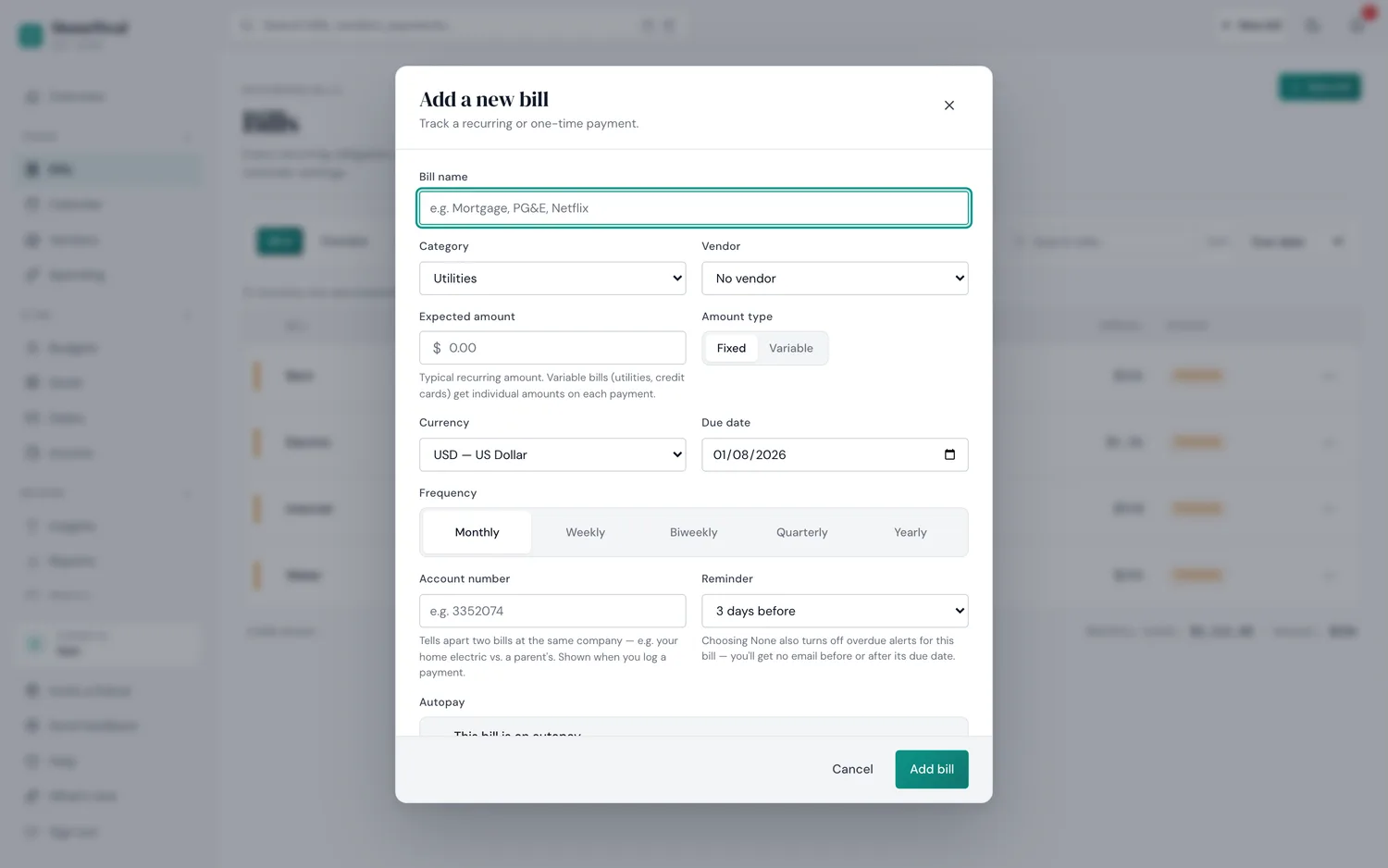
The actual "add a bill" form — currency is a per-bill field, not a household-wide setting.
- Create your household and invite your partner. Up to 6 members on the Family plan ($14/mo or $132/yr early-bird). Just two people? Pro ($9/mo or $84/yr early-bird) covers bill tracking and the Health Score, but not member invites or splitting.
- Set your household base currency. The currency you'll see totals in — pick whichever you think of as "home."
- Add your recurring bills manually. Enter the name, amount, due date, and the currency it's actually charged in. HomeWeal auto-converts to your base currency at the current rate.
- Assign ownership and split rules. Each bill has an owner and a split (50/50, custom percentage, or one person covers it). The settle-up tracker shows net balances automatically.
- Turn on the Health Score. A 0-100 on-time payment score. Not gamified — no streaks, no badges.
- Set a shared goal if you have one. HomeWeal also tracks basic income and savings goals alongside bills, so a joint target sits next to what you're both responsible for. It's a web app with an installable version for iOS and Android, so whichever of you opens it, it's the same household.
The key difference from a budgeting app: you're not categorizing every coffee and grocery run. You're tracking the recurring bills that actually matter for household stability.
Who this isn't for
HomeWeal is not a budgeting app — if you need full spending categorization, envelope budgeting, or investment tracking, YNAB and Monarch do that better. It's also not for you if you want automatic bank feeds; we deliberately don't link accounts (a bank-sync add-on is on the roadmap, not available yet). And if you're a single person with no shared household bills, the free Solo plan is fine for your own utilities, but you're not really the target — this is built for the coordination problem that cohabitation creates.
Common mistakes cross-currency couples make
- Tracking bills in your head. "I paid internet, you got groceries, we're even" — small imbalances compound quietly. Write it down.
- Mixing household bills with personal spending. Keep the household layer separate from your own coffee purchases.
- Ignoring due dates across time zones. If one partner travels, "the 15th" means something different in Tokyo than in New York — due-date tracking and the Health Score catch this before late fees.
The privacy angle
Bank-linking apps require read-only access to your financial accounts through aggregators like Plaid — your transaction history and balances pass through a third party. HomeWeal's manual-first entry means your financial data stays between you and your partner. The trade-off is entering bills yourself, which for a typical household is a few minutes a week.
Our verdict
For cross-currency couples who share recurring bills and want to stay on top of them without linking bank accounts, HomeWeal does one narrow job well: track bills, convert currencies per bill, split costs fairly, and give you a Health Score. If you need full budgeting, use YNAB or Monarch. If you need simple ad-hoc splitting, use Splitwise. Billing is pay-now with a 30-day money-back guarantee — no free trial, but low risk to try.